


Experience X410 in native Windows 11 Fluent theme with the new version 5!
X410 now utilizes .NET Desktop Runtime and improves its consistency with Windows user interface as well as its performance and responsiveness.

Due to this change, X410 now requires .NET Desktop Runtime version 9 or higher. But if you are using Windows 11, you probably already have the runtime installed; if it is not, you can easily download and install it from the following official Microsoft website; we recommend installing the latest active version (it is version 10 as of this writing). When installing a runtime, make sure you are installing a .NET 'Desktop' Runtime.
Download .NET
https://dotnet.microsoft.com/en-us/download/dotnetX410 now supports automatically resizing X-Window GUI mouse pointer images according to Windows settings. Hence you should be able to get more consistence user experience even when you have multiple monitors with different DPIs or scaling settings.
X410 resizes the mouse pointer image directly from the raw image configured in your X-Window settings; X410 does not actually access your mouse pointer image files. Hence, for crisply resized mouse pointers in X410, we recommend installing mouse pointer theme with higher resolution and updating your X-Window mouse pointer settings to use bigger images (ex. 64x64 rather than 16x16).
Configuring mouse pointer size in a Linux GUI environment varies but simply setting
XCURSOR_SIZEenvironment variable before launching your GUI apps should work in most cases.export XCURSOR_SIZE=64
The new version 5 improves its stability and performance by including updated third-party libraries as well as various bug fixes and workarounds. If you are experiencing strange slowness or crashes while using X410 after recent Windows 11 updates, you should definitely try this new version!
X410 Standalone version 5 is provided as a free upgrade for the previous Standalone version license owners. If you already own a Standalone license, you simply need to use your existing license activation code on the new version 5.



X410 now natively supports ARM64 processors!
If your Windows is running on ARM64 processors such as the recently released Snapdragon X Elite, we now have a version of X410 that is built specifically for such processors. The new native version of X410 for ARM64 processors does not significantly boost performance, but it will surely improve performance as well as lower its power consumption.
You can of course run X410 executables built for x64 processors on ARM64 based computers without any problem. But those executables will be running in emulation mode hence consuming additional resources and power.
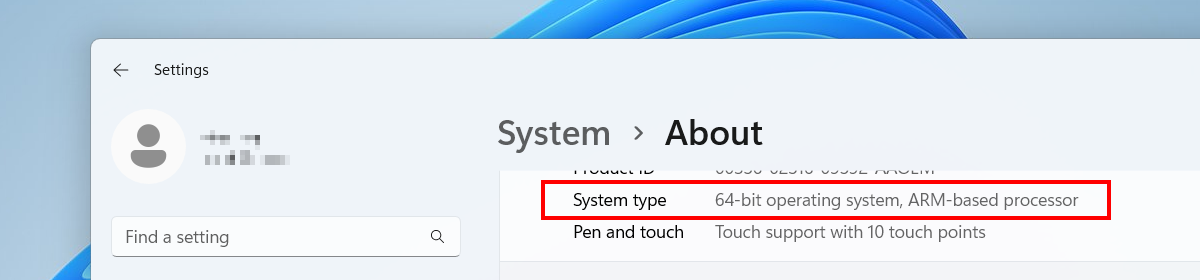
If you have installed X410 from Microsoft Store, Windows will automatically replace the existing x64 version with the new ARM64 version while updating X410 to the new version 4.1.0 if your Windows is actually running on ARM64 processors.
For the Standalone version, we have prepared a separate installer for ARM64 processors. If your Windows is indeed running on ARM64 processors, you simply need to download and run the new installer from our website at https://x410.dev/download/. If you already have installed X410 and activated your license, the new installer should be able to detect it and update only the necessary files that includes automatically replacing x64 executables with the new ARM64 version.
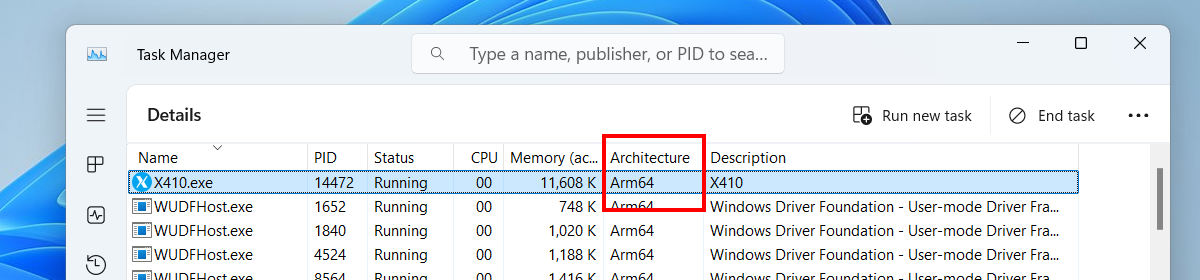
When you run the new ARM64 version of X410, you should be able to notice it in the Windows Task Manager; [ Details ] section of the Windows Task Manager should show the 'Architecture' of the running X410 as 'Arm64'.
The new version 4.1.0 also includes the following improvements.
Fixed unexpected crashes when X-Window apps are rapidly opened and closed repeatedly.
Improved maintaining keyboard states in edge cases that might have caused generating endless key-pressed events in previous versions.

'X410 (Version 3)' is updated to version 3.8.6
Fixed unexpected crashes when X-Window apps are rapidly opened and closed repeatedly.
Improved maintaining keyboard states in edge cases that might have caused generating endless key-pressed events in previous versions.

X410 version 4.0.3 fixes the problem with command-line switches
All command-line switches are now correctly applied to the instance of X410 for the specified display number.
Initialization routines for input devices (ex. keyboard) are updated to minimize the chances of crashes immediately after starting X410.
X410 Standalone version now supports loading its digital license key from a common Windows registry for multiple user accounts on the same computer. It needs to be set up manually by an administrator, but it should be handy when you have a shared computer with multiple user accounts. For more detailed information, please contact support@choung.net.

'X410 (Version 3)' is updated to version 3.8.5
All command-line switches are now correctly applied to the instance of X410 for the specified display number.

X410 version 4.0.2 improves managing Linux GUI apps with dock panels designed for Linux desktops
Popup menus for Linux GUI apps should now be closed automatically when you click on Windows apps or the desktop background in Windowed Apps mode.
Improved positioning tooltips and other miscellaneous popup windows when the DPI scaling option is enabled for Windowed Apps mode.
Improved handling of popup menus and widgets on dock panels (ex.
xfce4-panel) in Windowed Apps mode.Fixed the memory access violation error when a full desktop session executable (ex.
xfce4-session) is started in Windowed Apps mode.

'X410 (Version 3)' is updated to version 3.8.4
Fixed the memory access violation error when a full desktop session executable (ex. xfce4-session) is started in Windowed Apps mode.
This update is released only for the 'X410 (Version 3)' owners who purchased a perpetual license from Microsoft Store before the subscription-based version was released. If you owned a license for 'X410 (Version 3)' and want to install it, please read the following post for the additional information:
How to install 'X410 (Version 3)' from Microsoft Store
X410 version 4.0.1 fixes the clipboard sharing problems for non-zero display numbers
Fixed the clipboard sharing issues that occur when X410 is set for a non-zero display number.
X410 version 4 is here!
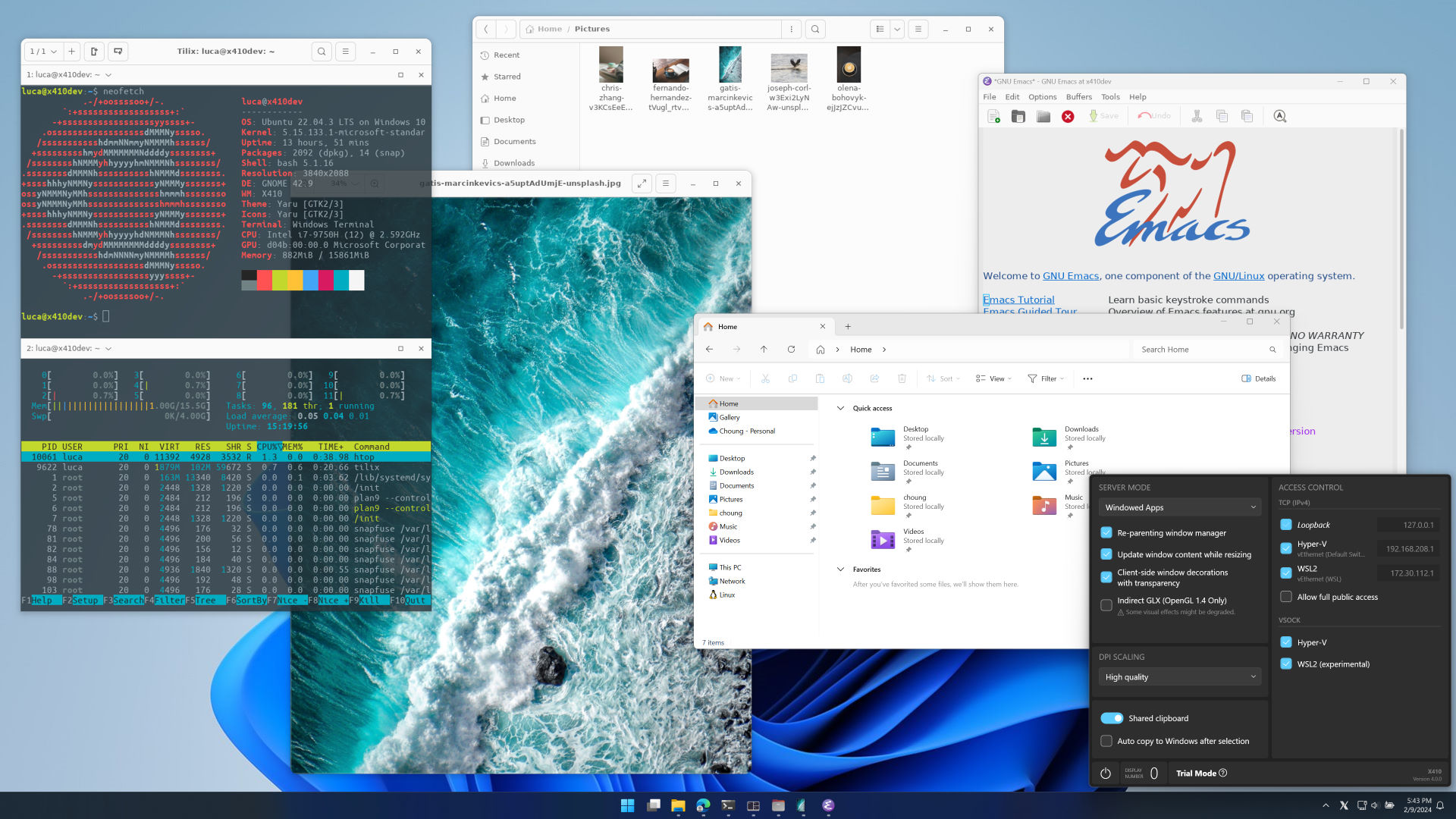
All new Settings window! It now has Windows 11 like user interface and colors.
If you have X-Window bitmap (*.pcf.gz) or TrueType (*.ttf) fonts that you want to add to X410, you can now simply add their folder paths in X410 Settings, i.e.,
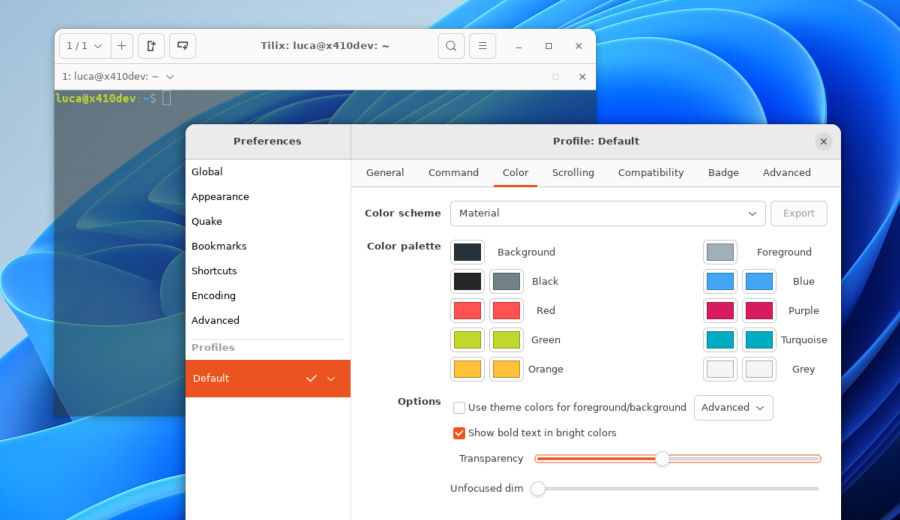
Settings»Additional Font Paths»Add a font folder path. Once they are added to X410, the fonts in those folders can be used by any X-Window GUI apps connected to X410.X410 now supports semi-transparent background for Linux GUI apps running in Windowed Apps mode. If you have a Linux GUI app that manages its own window decorations (ex. frame, close button etc.), you can also seamlessly enjoy its rounded window frame if the app supports it (ex. GNOME apps).
X410 started supporting a re-parenting window manager in version 3.8. In version 4.0, we have improved its performance as well as its compatibility. Just start your Linux GUI apps and enjoy them as you would in an actual Linux machine!
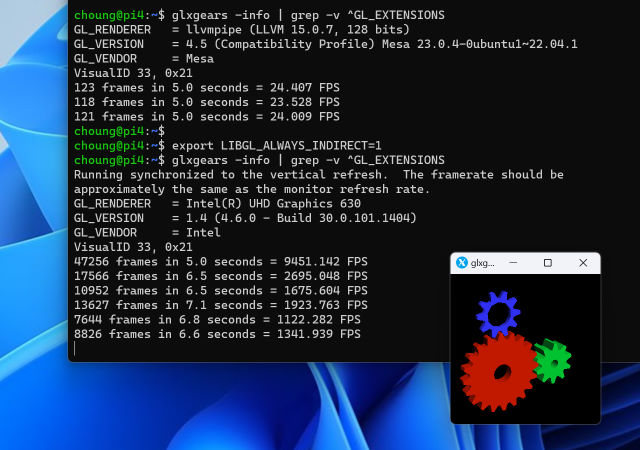
Indirect GLX is back! Nowadays even the software rendering engine for OpenGL in Mesa3D library supports version 4.x and it is very usable for most cases. Hence, we recommend using the Mesa3D library in its default settings. However, if you want to utilize the indirect or remote GLX feature of X-Window System, no problem! X410 now natively supports it!
UPGRADING TO VERSION 4
If you are currently using a subscription-based version of X410 installed from Microsoft Store, you do not have to do anything, Windows will automatically deliver the new version 4 to your computer. If you want to manually force the update, you can of course use the Microsoft Store app on the Windows Start menu.
If you previously purchased a perpetual license for X410 from Microsoft Store (it is currently labeled as 'X410 (Version 3)'), it will not be updated to version 4 as announced last year. But you should not have any problem continue using it as explained in the announcement; even though they have the same name, the subscription-based version of X410 is released as a separate product. For more information about installing 'X410 (Version 3)', please read the following post:
How to install 'X410 (Version 3)' from Microsoft StoreSince we now released version 4, there will be no major changes or updates to 'X410 (Version 3)'. But we will keep maintaining 'X410 (Version 3)' with bug fixes and minor improvements.
If you own a license for the Standalone version of X410, you can readily apply it to the version 4. Although a major version release is usually accompanied by upgrade options with discounts for previous version users, we have decided to offer the new version 4 free of charge to all the Standalone version 3 license owners. You can simply treat the new version 4 as a regular update and use your current license activation code.

'X410 (Version 3)' is updated to version 3.8.3
This update is released only for the 'X410 (Version 3)' owners who purchased a perpetual license from Microsoft Store before the subscription-based version was released. If you owned a license for 'X410 (Version 3)' and want to install it, please read the following post for the additional information:
How to install 'X410 (Version 3)' from Microsoft StoreWHAT'S NEW
X410 now restricts users from resizing a Linux GUI app too small while running it in Windowed Apps mode; its minimum window size is determined according to the properties set for the app by its developers.
Fixed the WSL2 IP detection problem when you have multiple ethernet adapters configured in a certain order.
Improved the stability of clipboard sharing; it should no longer be a cause for unexpected crashes or unresponsiveness in Linux GUI apps.